For clubs, studios & busy spaces

Your spaces.
Your people.
One clear schedule.

Classes, staff, spaces and equipment move together. Coach, space and class clashes stay flagged until they're fixed. Your staff see their day on their phone.

7-day demo, then 30 days free. No card needed.

GymnasticsSwimDanceMartial artsClass-based clubs
Schedule Donkey

The real board. Room to see it.

One schedule.
Every screen.

A full view when you're planning. Your team's day when they're on the move.

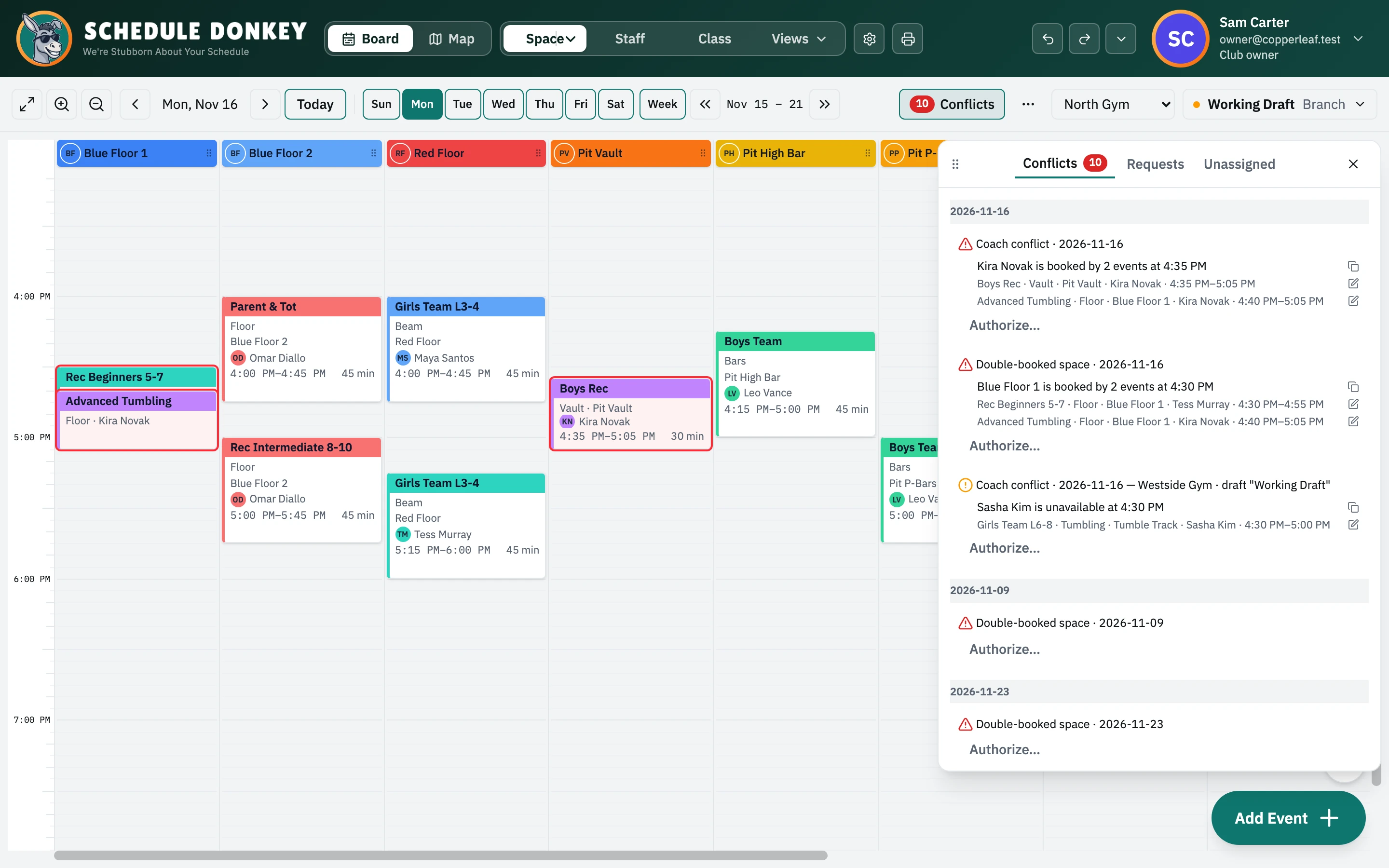
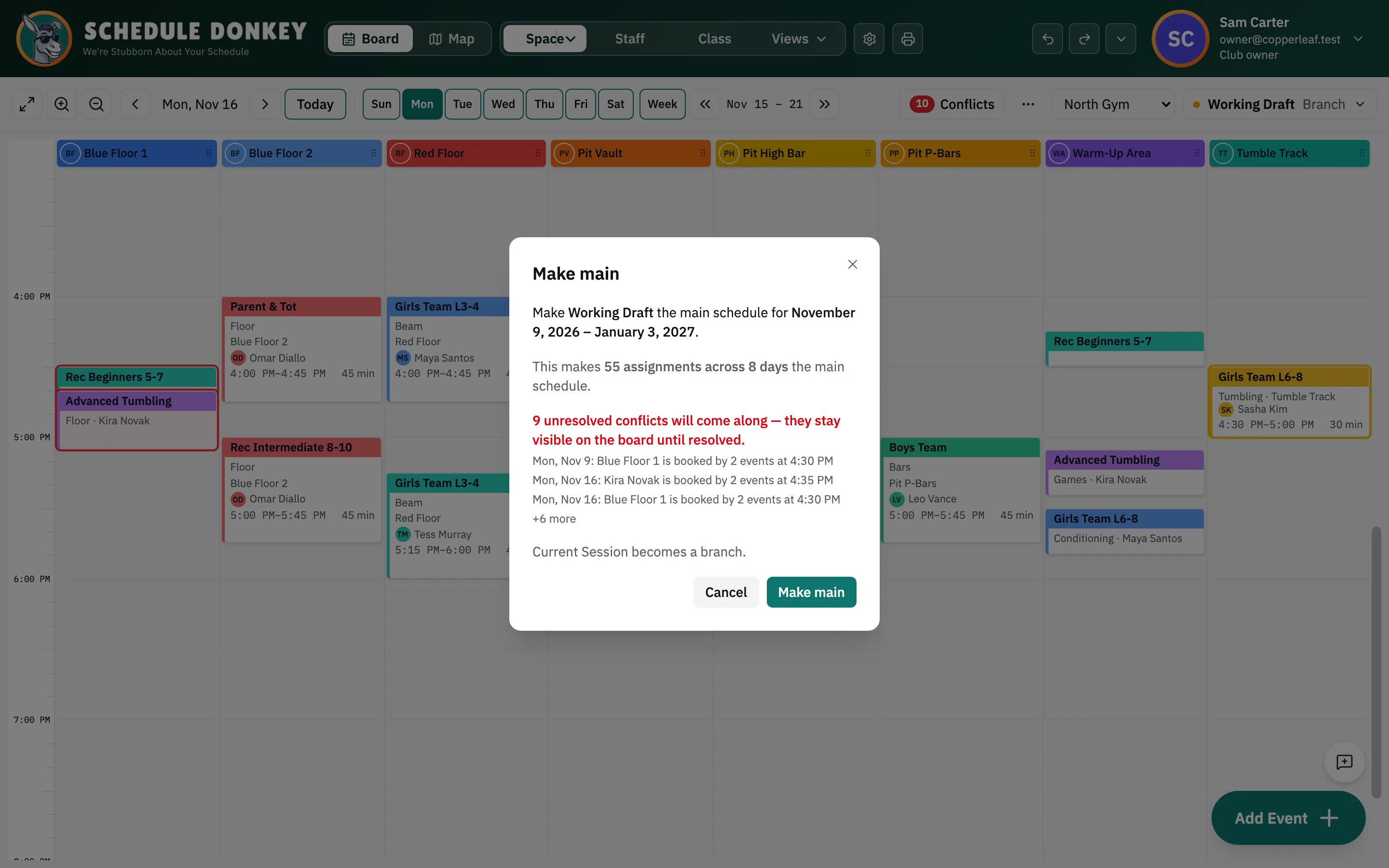
Schedule Donkey board with the Conflicts panel open at fictional Copperleaf Gymnastics
Widescreen: see the whole schedule.
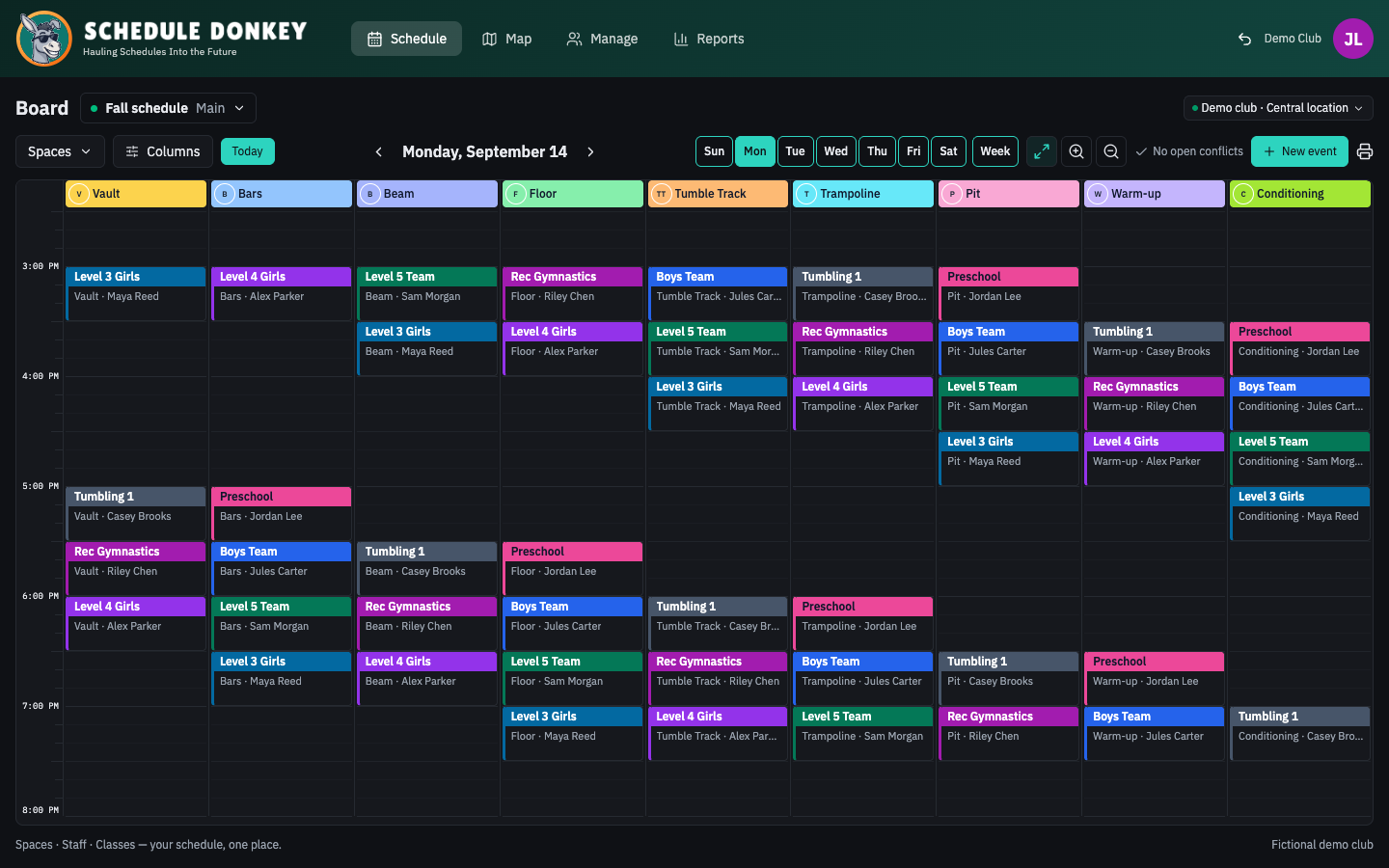
Laptop schedule in dark mode with fictional classes, staff and spaces
Laptop: plan and adjust your day.
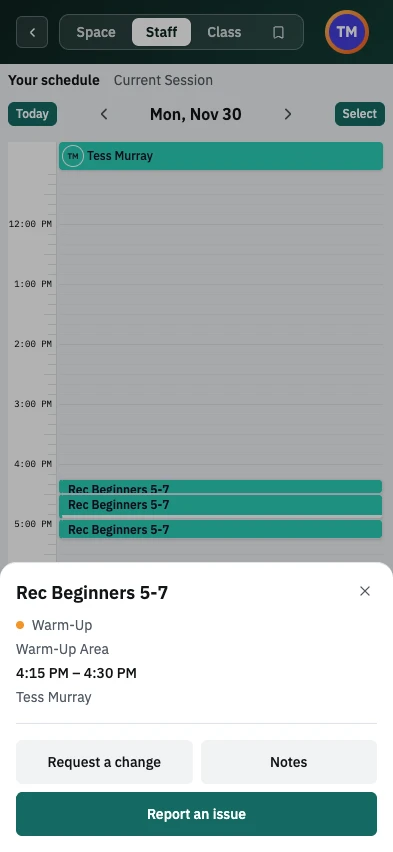
Coach phone schedule with a class open, Request a change and Notes
Phone: take the schedule with you.

Schedule Donkey with a fictional gymnastics club.
Your classes, staff, spaces, and activities are configurable.

Explore full-size viewsWidescreen ↗Laptop ↗Phone ↗

Keep your registration tools.
Bring the class list. Plan the moving parts.

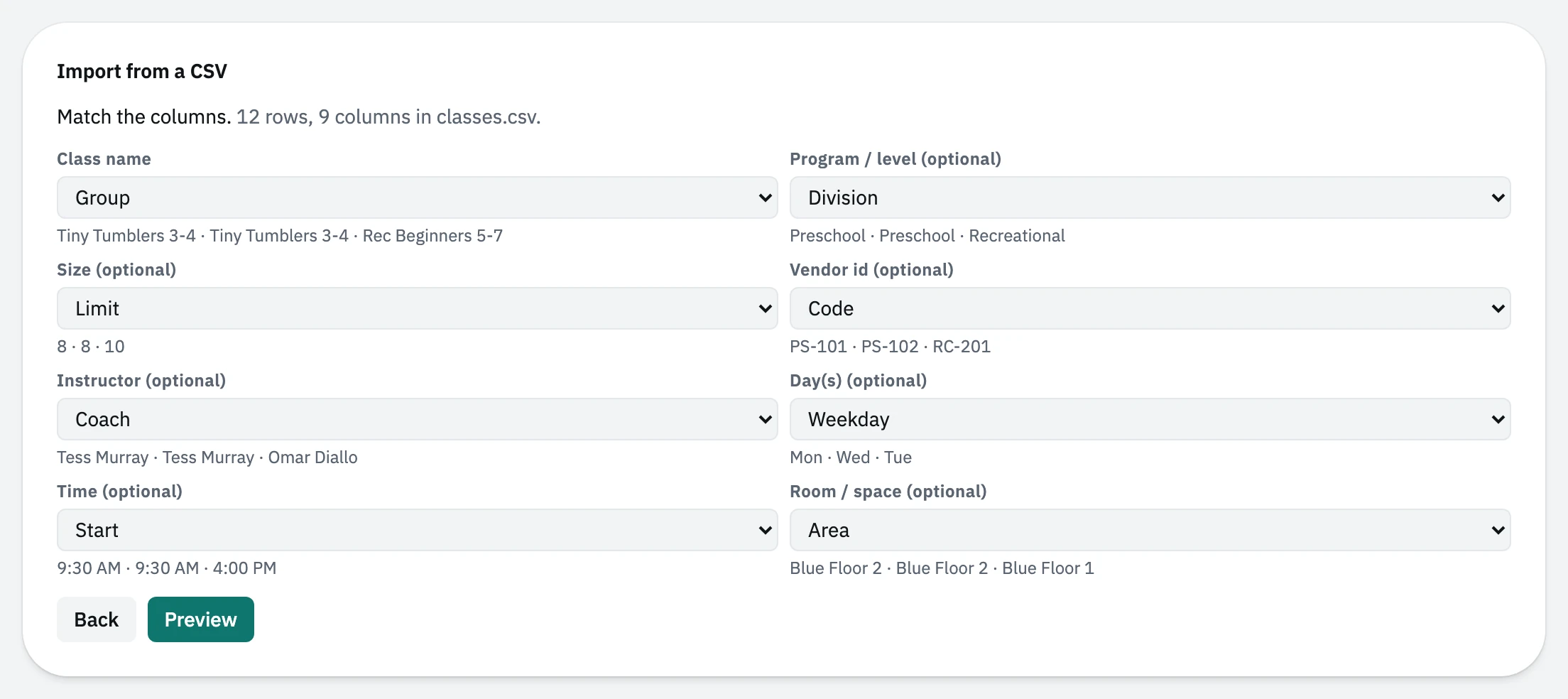
One-way CSV import

Why Donkey

A place for every moving part.

One board for the people, places, and details that make your club work.

App screenshots use fictional Copperleaf Gymnastics data. Open a screenshot for a closer look.

Conflicts can't hide.

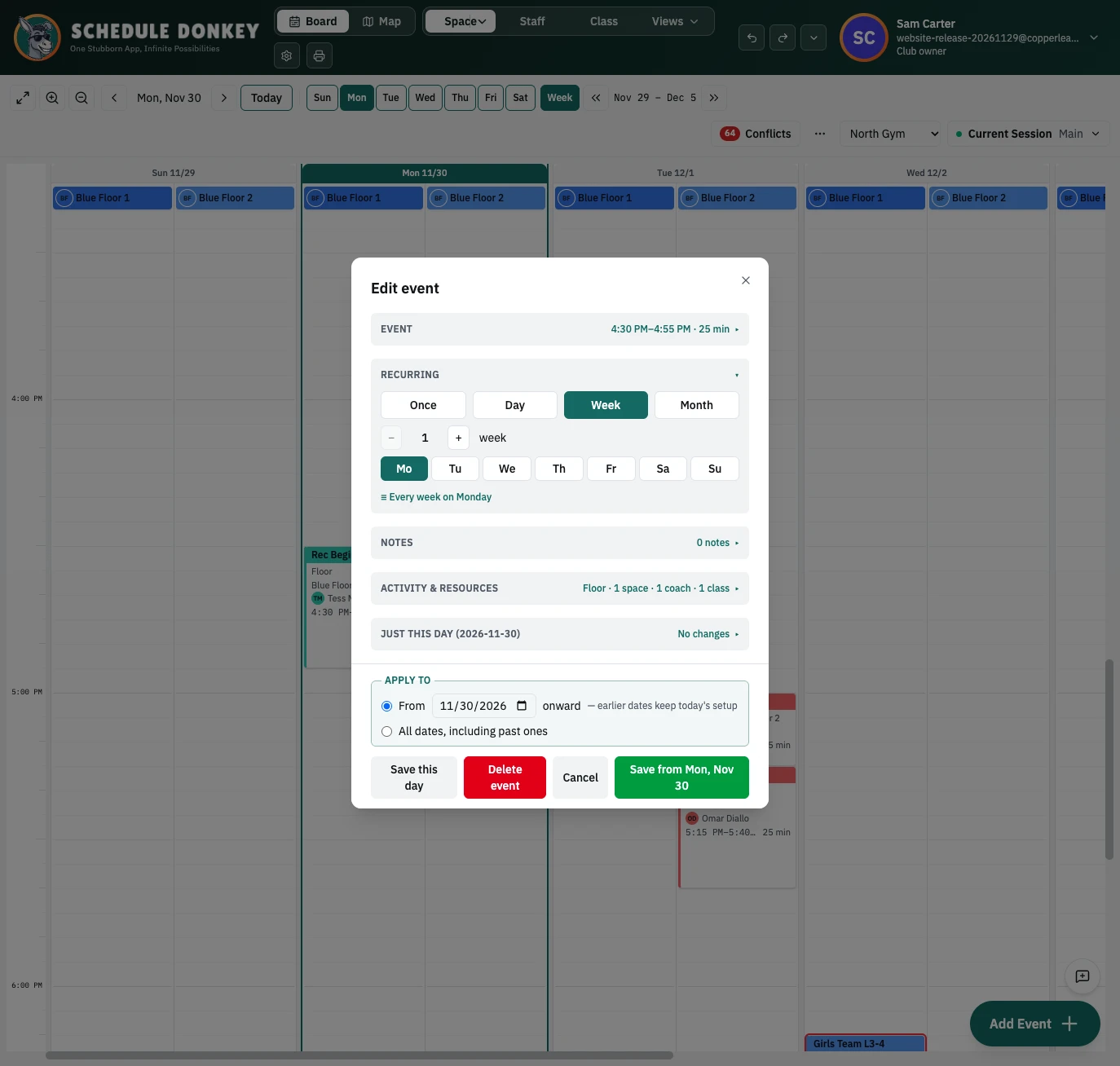
Double-booked coach, space or class, over capacity, a space that can't host the activity, a coach already at another location: six kinds, flagged as hard or soft until resolved, on branches and on the main schedule. Sign one off with a reason when it's on purpose.

One move, everything together.

Drag a class and its coaches, spaces and equipment go with it. Rotations and circuits are one event across several spaces.

Branch it, then make it main.

Try next season on a branch while staff keep seeing today's schedule. Review open conflicts before making it main; the old main stays as a branch you can return to.

Their day on their phone.

Agenda, a private calendar feed for Google, Apple or Outlook, an email when a schedule goes main. Time off, availability and a change request, from their phone. No app to install.

Tess Murray's fictional coach schedule, with a class open and Request a change, Notes and Report an issue actions

Reports that find room.

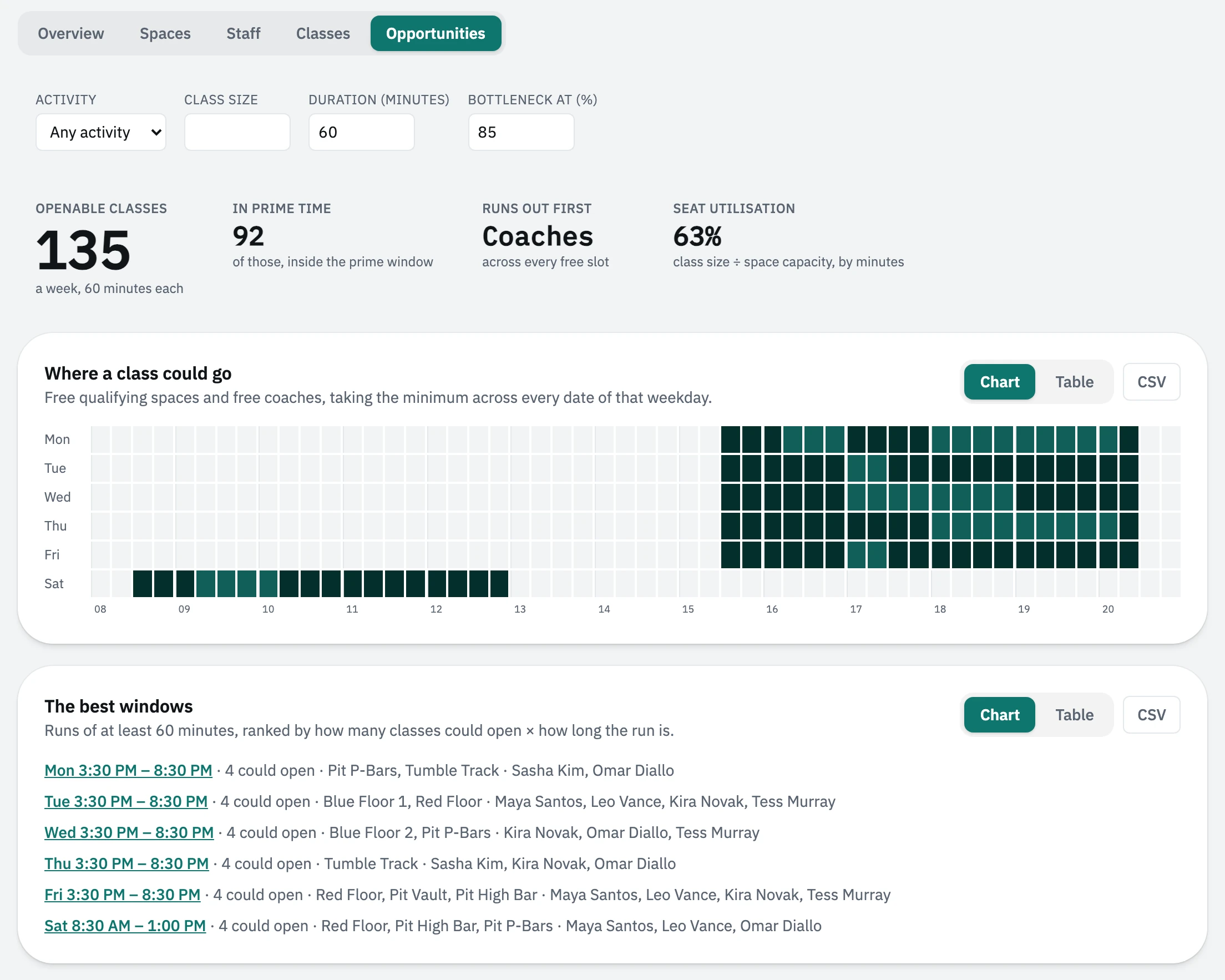
Utilisation and prime-time by space and coach. Coach load against availability. An Opportunities tab that counts how many more classes fit and says whether spaces or coaches run out first. Every chart a CSV.

Bring your own AI.

Connect Claude, ChatGPT or Claude Code. It reads the board, previews several moves together, applies them as one step, and ranks fixes by how many conflicts they clear. Every call is logged.

The floor map.

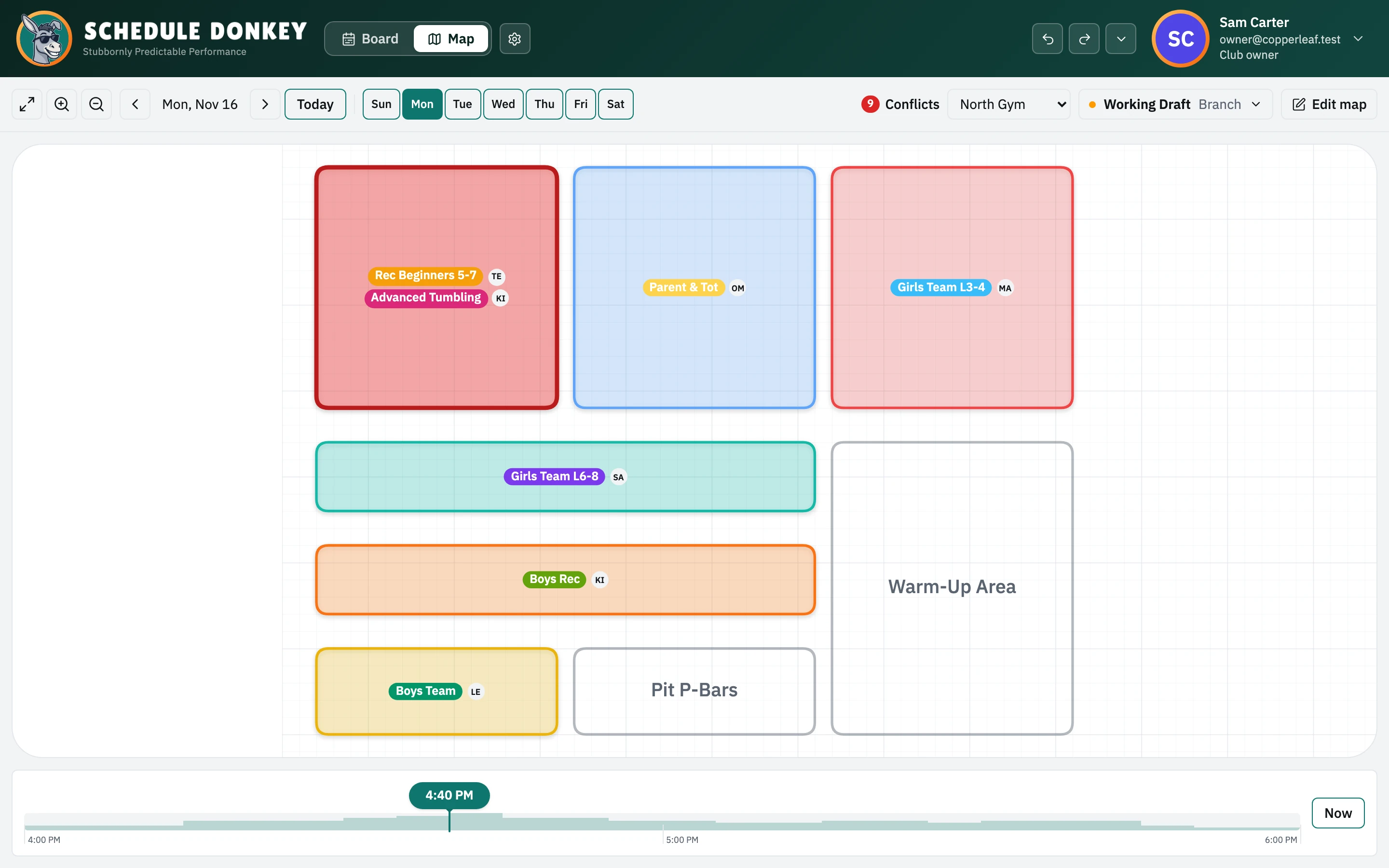
Trace it over a photo of your space. Watch it fill through the day. Leave it on the lobby screen.

Start with your own schedule.

A demo club in one click. Import classes and staff from a CSV with a mapping preview; import again later and it updates instead of duplicating. A setup guide walks the 14 steps.

Bring your own AI

Work through the puzzle together.

Assistant beta · Included with fair use
  1. You

    Sarah is out Friday. Cover her 4pm and 5pm and tell me what breaks.

  2. Assistant

    Preview: Alex covers the 4pm class; Jordan covers the 5pm. Two moves. Open conflicts: 2 before, 0 after.

  3. You

    Apply.

Preview first. Applied as one step when you say so. Works in Claude, ChatGPT and Claude Code. Bring your own AI account; its plan requirements and usage charges apply.

Illustrative conversation with fictional staff.

A simpler way to get there

From a busy week
to a working plan.

Let's try it
  1. 01

    Bring your classes.

    Import a class list from a CSV export, or enter it yourself. Keep using your registration system.

  2. 02

    Find the right fit.

    Arrange staff, spaces, and equipment on the board. See conflicts while you plan, and work through them.

  3. 03

    Get everyone in sync.

    Make the schedule main. Staff can check their day on their phone or subscribe to their calendar feed.

Room to grow

One location or a few.
Same helpful Donkey.

Every feature. Unlimited users and classes.
Choose by active locations and coaches scheduled.

Single

For one busy location

$49/ month

USD, billed monthly

1 active location

Up to 30 coaches on the schedule each month

Start your free demo

Multi

For your bigger picture

$179/ month

USD, billed monthly

Up to 8 active locations

Unlimited coaches

Coaches are checked across locations; clashes stay visible until resolved.

Start your free demo

What every plan includes

Every plan includes unlimited user logins and classes. Single: up to 30 coaches scheduled per month; Club and Multi: unlimited.

  • Drag-and-drop board with Space, Coach and Class views
  • Week and month views, saved views
  • Live conflict detection, six kinds
  • Conflict sign-off with a reason
  • Branches and Make main with rollback
  • “From this date onward” edits
  • Undo and redo, audit log
  • Recurrence: weekly, every N weeks, monthly, with exceptions
  • Events with several spaces or coaches
  • Equipment on every class
  • Space × activity rules and program requirements
  • Coach phone view and private calendar feeds
  • Email when a schedule goes main
  • Coach availability, time off and change requests
  • One-day substitutes
  • Notes and lesson plans; dictation in supported browsers
  • Reports with CSV: utilisation, coach load, classes, opportunities
  • Scheduled hours per coach
  • Floor map with the day animated
  • Print: wall copy or one-coach handout
  • Import a CSV export from your registration system
  • Whole-club JSON export
  • The Assistant: connect your own Claude or ChatGPT
  • Role-based access for your team
  • In-app support with screenshots
  • Unlimited users and classes

7-day demo, then 30 days free on your own club. No card needed.
Prices in USD, plus applicable sales tax. 9+ locations? Let's talk.

Ready to subscribe? Plans are currently billed by invoice.
Email us and we'll help you get set up.

Find the right fit

Different tools. Different jobs.

Keep the tools that handle registration. Give the schedule its own clear view.

Swipe or scroll sideways to compare the categories.

Typical category focus. Features and pricing vary by product.
What you're planning Registration systems Room-booking tools Staff-shift tools Schedule Donkey
Coach + space + equipment on one event Classes & enrollment Spaces & bookings People & shifts All together on one event
Conflicts flagged until resolved Varies by tool Room availability Shift coverage Six kinds, persistent flags
Draft schedule reviewed before it goes live Varies by tool Varies by tool Varies by tool Branches + open-conflict review
Reports on capacity, not enrollment Enrollment & revenue Room use Hours & coverage Space use, coach load, opportunities
Connect your own AI Varies by tool Varies by tool Varies by tool Claude, ChatGPT, Claude Code
Unlimited users Varies by tool Varies by tool Varies by tool Included in every plan
Published price, no-card trial Varies by tool Varies by tool Varies by tool From $49/month; no card to try

A few good questions

Before you
jump in.

Something else on your mind?
You're talking to the people building it.

Ask us a question
How does the free start work?

Signing up creates a demo club you can explore for 7 days. Choose “Make this my club” to start 30 days free on your own club, with the option to keep what you built or start fresh. Neither period needs a card. After the trial, the schedule becomes read-only unless you subscribe.

Can I import my existing classes?

You can import a class list from a CSV file or enter classes by hand. CSV imports are one-way: changes made in another system are not synced automatically.

Do my staff need to pay?

No per-login fee: every plan includes unlimited users. Single includes up to 30 coaches on the schedule each month; Club and Multi have unlimited coaches. Staff can check their day on their phone, manage availability and time off, request changes, and add their personal calendar feed to their calendar app.

How do subscriptions and cancellation work?

Subscriptions are currently billed by invoice. Email support@scheduledonkey.com to subscribe, change plans, or cancel. Cancellation takes effect at the end of the paid period. Your club then becomes read-only, and its scheduling data is kept for at least 12 months. See our Terms of Service for billing and refund details.

Can I take my scheduling data with me?

Yes. The owner can export the club's scheduling data as JSON, and reports can be downloaded as CSV. These exports are available while the club is read-only too. Our Terms describe what is included; email us if you need other club records.

Who is Schedule Donkey for?

Clubs and studios in the United States that schedule staff, classes, spaces, and equipment — from gymnastics, swim, dance, and martial arts to private class-based programs. The person signing up must be at least 18 and authorized to act for the club. If you run a school, school district, or public program, contact us before signing up so we can discuss a separate agreement.

Can a coach ask for a sub?

A coach sends a change request from their phone. An admin can put a substitute on any single day, and the picker shows who is free and why the others aren't.

Does it do payroll or a time clock?

There is no payroll or time clock. The Staff report exports scheduled hours per coach as CSV.

Push notifications or texts?

Email and the private calendar feed are available today. Push notifications and text messages aren't supported. There is no app to install.

Does it generate rotations for me?

Rotations are one event across several spaces, moved as one. Automatic generation isn't built; the Assistant can propose moves.

Is equipment double-booking caught?

Equipment is assigned with the class and shown on the board and in reports; it does not raise a conflict today.

We're stubborn about your schedule.

Less juggling.
More possibilities.

Your people. Your places. A little more breathing room.

Give Donkey a try — start your free demoNo card. No pressure. Just a better view.